Kanban
Columns are your phases: rename them, pick a colour and an icon, then move every task forward as it happens.
 Organizr
Board turns ideas, tasks and long-running projects into columns you can actually see. Kanban, Timeline and To-do in one place, as a dedicated iPhone app or inside Organizr on every device.
Three views
Columns are your phases: rename them, pick a colour and an icon, then move every task forward as it happens.
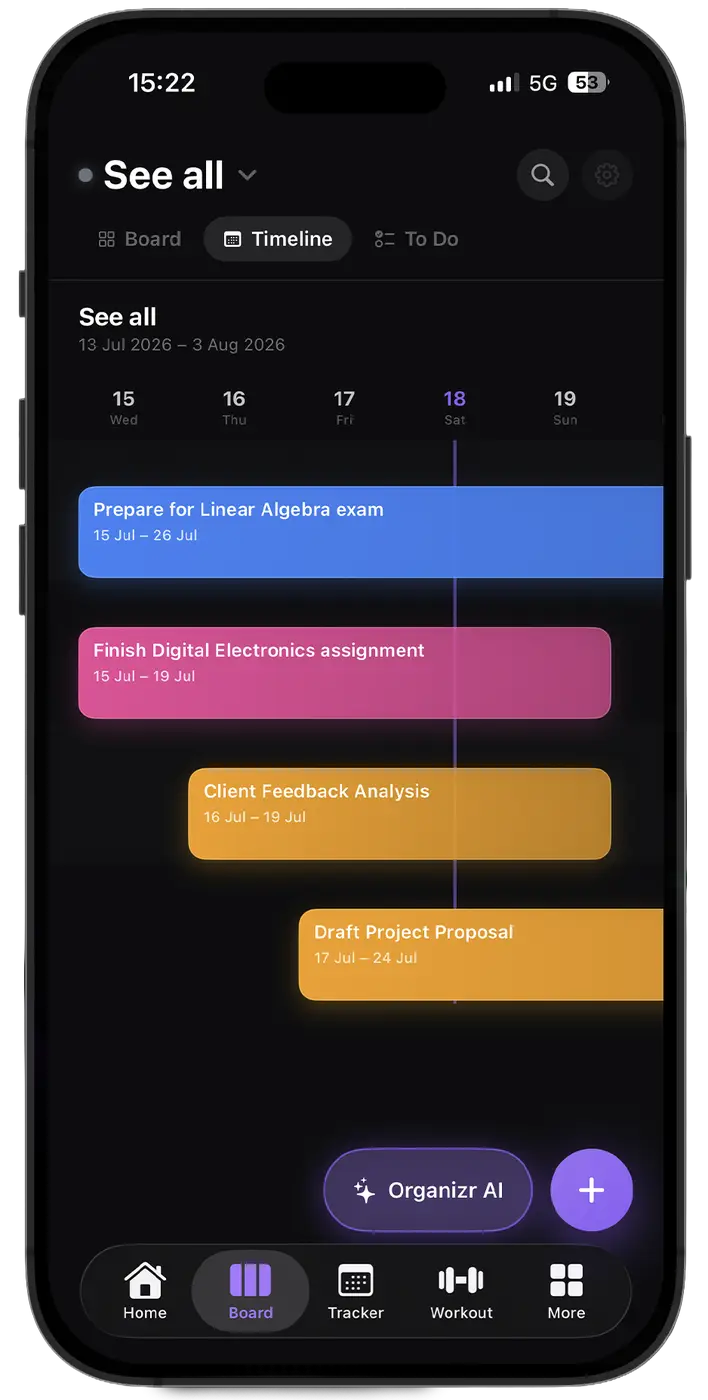
Give a task a start and an end date and it lands on the timeline, in its own colour.
Everything due, as a list you can tick through. No columns, no noise.
Inside every task
Keep work, personal life and side projects apart, each with its colour and icon, or open “See all” to view every board at once.
Columns are yours: name, colour and icon for every phase of your workflow.
Mark what is urgent and label tasks so the right ones surface first.
Break a task into steps, each with its own due date if it needs one.
Get notified before a task is due, on the days that matter to you.
Ask the AI to turn a goal into tasks and events, then add them to the board in one tap.
Find any task by title or note across all your workspaces.
Export your Board whenever you want and bring it back in on another device.
With Premium, Board syncs end-to-end encrypted with Organizr on iPhone, Mac and Windows.
Mac & Windows
On desktop, Board lives inside Organizr with all its workspaces, phases and the full timeline.
Two ways to use it
A dedicated app with Board, Timeline, To-do and Organizr AI in the tab bar. Light, fast, only your projects.
The same board next to habits, workouts, money and goals, on iPhone, Android, Mac and Windows.
From the blog
A year is too long to stay accountable and a week is too short to change anything. Why a quarter is the unit that fits both training and life.
Motivation is a mood, and moods are a bad foundation. How to replace it with defaults, friction and a record you can look at when you do not feel like it.
New habits fail because they have no trigger. Anchor them to something already automatic — coffee, the commute, closing the laptop — and the trigger comes free.
Yes. Board is free with one workspace, and Organizr Lite includes one unlimited board. Premium unlocks unlimited workspaces and covers Board and the full Organizr on every device.
Board is a dedicated iPhone app focused only on your projects. Organizr includes the same Board next to every other section. They share one account and one licence, and with sync turned on the same tasks appear in both.
Yes. Any task with a start and an end date appears on the Timeline, with a colour you can choose for each event.
With Premium, Board syncs end-to-end encrypted with Organizr on iPhone, Mac and Windows. Board data on the server does not expire automatically.
Yes. Organizr AI can propose tasks and events from what you ask, and you decide what to add to the board.
The Board app runs on iPhone with iOS 18 or later. Board is also part of Organizr on iPhone, Android, Mac and Windows.